Introduction
The backend application of scrumlr.io targeted by the web client is written in go. Before contributing to the project, please make sure you have read the contributing guideline.
Recommended Requirements
Section titled “Recommended Requirements”- Docker
- Docker compose
makein version >= 3.81
Note: make is already installed on MacOS but the version is smaller than the required version. Run
brew install make to update make version to newest version
Quick start
Section titled “Quick start”Before you can run the Scrumlr backend locally for development, you first need the following services to be running
- a postgres database
- a nats instance
For that you can use the provided docker compose files. To start the docker containers either run
make run-docker-devor
docker compose --profile dev upAfter the container started, you can start the Scrumlr backend with.
cd src/go run . --database "postgres://admin:supersecret@localhost:5432/scrumlr?sslmode=disable" --disable-check-origin --insecurePlease make sure to read the guidelines for the backend.
Testing
Section titled “Testing”To run the tests locally run
make testFor more information about the tests refer to the testing documentation.
Architecture
Section titled “Architecture”In the picture below is a high level overview of how Scrumlr works
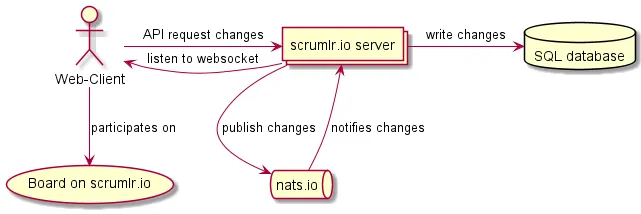
For a detailed overview of the backend read the architecture documentation.